Loupe

Pathology Research Workspace

材料、写作与实验
在同一个项目推进Bring evidence, writing
and experiments together.

Loupe 面向病理科研,集中管理文献、基金草稿和计算成果。整理依据、完善章节、运行可复核的计算,保留来源、版本和执行记录。Loupe brings literature, grant drafts and computed artifacts into one pathology research project. Organize evidence, revise sections and run reproducible computation, with sources, versions and execution records retained.

项目与来源 Projects & sources 基金参考草稿 Grant drafts 固定统计与复现 Reproducible analysis 共享科研技能 Shared skills

Loupe research › review

点选一步了解 / Select a step

从研究材料到有依据的草稿与计算成果 / materials → grounded drafts and computed artifacts

整理研究材料 / Organize research materials

把文献、资料与数据放进项目,保留文件来源和版本。 / Add literature, research material and data to the project, retaining their sources and versions.

查看对应界面 / See this step →

计算完成与科研结论成立分别判断 / Computed output is separate from scientific validity

能做什么 / What you can do

围绕一项研究,把工作接起来Keep a research project connected

资料与证据Materials & evidence

导入文献和研究资料,按问题检索原文片段,核对引用;复用其他项目材料时由你明确选择。Import literature and research material, retrieve relevant passages and check citations. You explicitly choose material reused from other projects.

对应成果 / Deliverables原文片段 · 引用位置Source passages · citation locations
查看这一步 / Explore this step

章节与版本Chapters & versions

依据已有材料起草,再按章节修订。保留参考来源和修改版本,尚未提供的研究基础明确待补。Draft from the material provided, then revise by section. Retain references and revisions, with missing applicant information clearly marked.

对应成果 / Deliverables可编辑草稿 · 修订版本Editable drafts · revisions
查看这一步 / Explore this step

计算与复现Compute & reproduce

核对预测数据后运行内置固定统计,保存脚本、指标、图表和复现资料;高级代码实验需单独配置。Check prediction data before running built-in fixed statistics, retaining scripts, metrics, figures and reproduction files. Advanced code experiments require separate setup.

对应成果 / Deliverables指标图表 · 复现资料Metrics and figures · reproduction files
查看这一步 / Explore this step

过程与控制Progress & control

在项目中查看进度、预算和成果,按需暂停或继续。清理先预览范围,保留需要的研究记录。View progress, budgets and artifacts in the project, and pause or resume when needed. Preview the cleanup scope and retain the research records you need.

对应成果 / Deliverables任务进度 · 成果记录Task progress · artifact history
查看这一步 / Explore this step

研究流程 / Research workflow

从一个目标开始,走到可核查交付From a goal to reviewable deliverables

先把问题说清楚,再整理材料、确定方法,逐步形成方案和计算成果。研究过程留在项目中,方便回来修改与核对。Clarify the question, gather the material and choose a method before drafting or computing. Keep the work in the project so you can return to revise and review it.

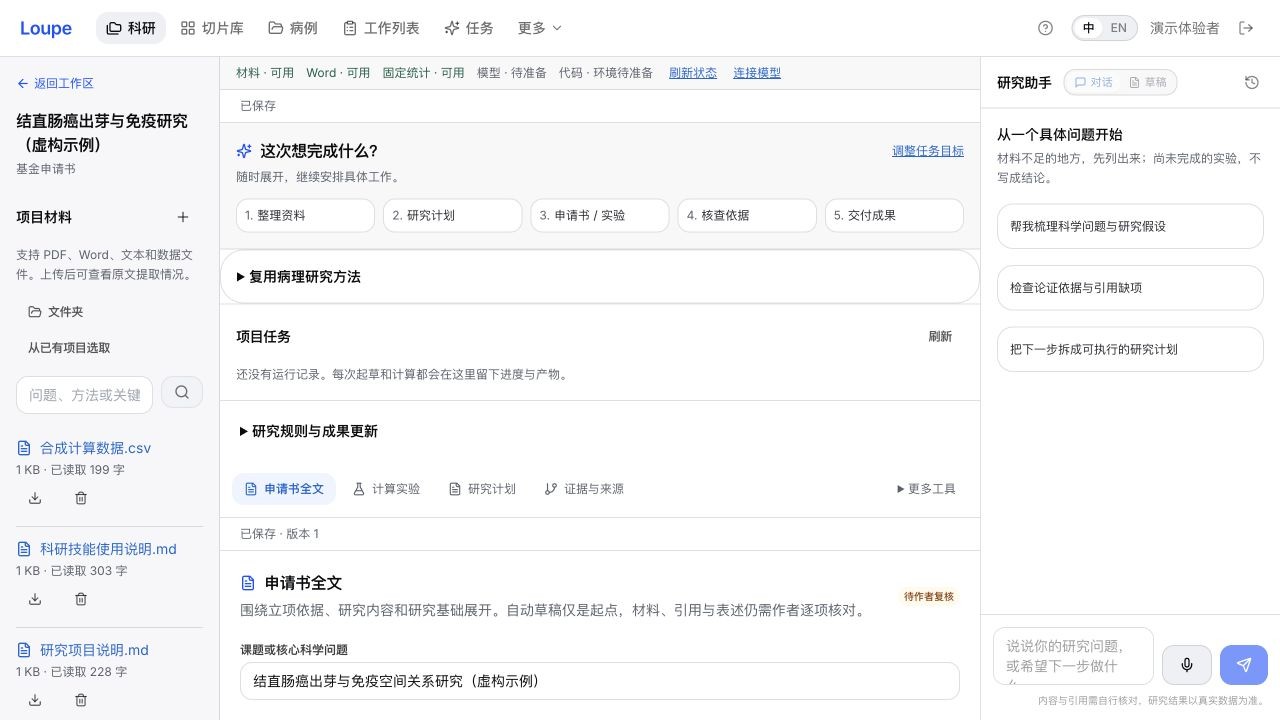
01 目标与材料 / Goal & materials

先说这次想完成什么Start with the outcome you need

为 TROP2、结直肠癌出芽或肾小球等课题建立项目,把相关材料与想法放在一起。尚未连接模型,也可以整理资料、编辑草稿。Create a project for TROP2, tumor budding, glomerular injury or another question, and bring the relevant material and ideas together. You can organize sources and edit drafts before connecting a model.

准备资料 / Inputs
研究问题、文献与数据文件Research question, literature and data files
形成成果 / Outputs
项目材料与本次任务目标Project materials and the current task goal
体验这一步 / Try this step →
目标与材料 · 合成演示界面 / Loupe research workspace · synthetic demonstration点击放大 / View larger ↗
目标与材料 · 合成演示界面 / Loupe research workspace · synthetic demonstration

02 章节与证据 / Sections & evidence

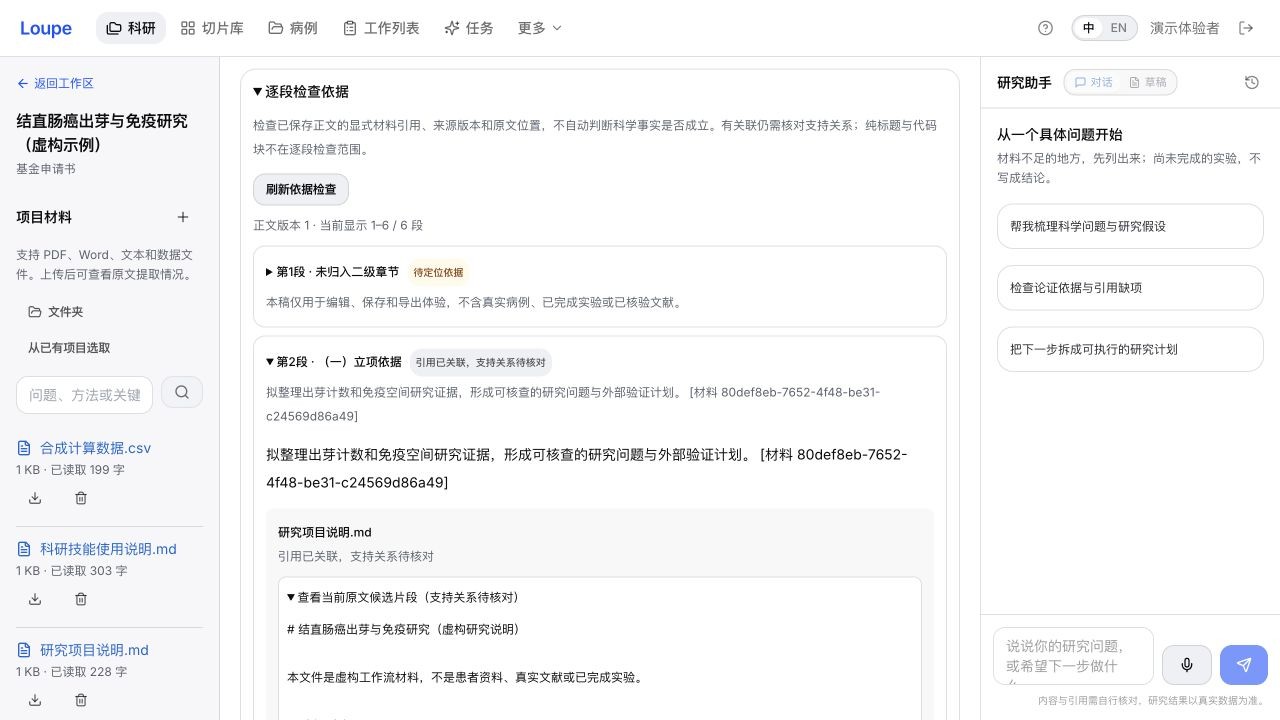
写一段,也能找到它的依据Trace a passage to its evidence

找到支持论述的原文,核对引用位置,再修改需要调整的章节。把已有基础、公开证据与拟开展的研究写清楚,来源变化时及时复核。Find the source passage behind an argument, inspect the citation, then revise the section that needs attention. Distinguish existing work, public evidence and proposed research, and revisit sources when they change.

准备资料 / Inputs
项目原文与待核对章节Project sources and sections to review
形成成果 / Outputs
引用位置与待补依据Citation locations and missing evidence
体验这一步 / Try this step →
章节与证据 · 合成演示界面 / Loupe section and evidence view · synthetic demonstration点击放大 / View larger ↗
章节与证据 · 合成演示界面 / Loupe section and evidence view · synthetic demonstration

03 方法与任务 / Methods & tasks

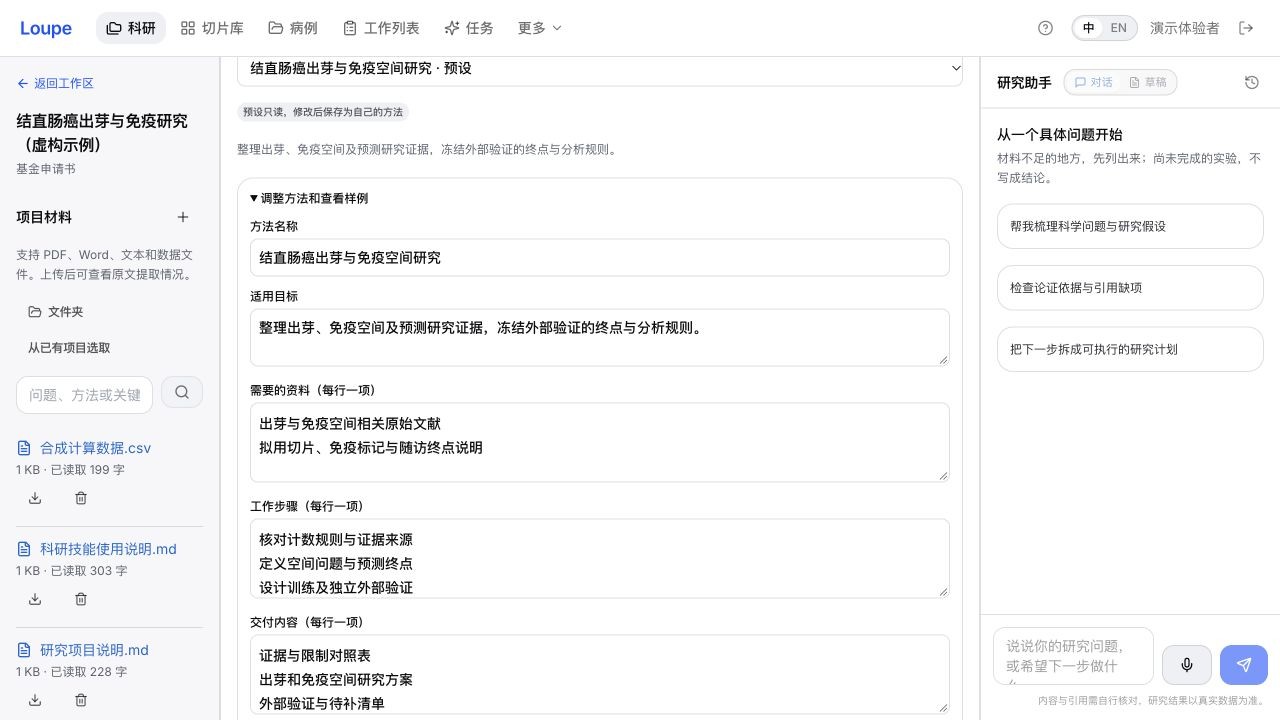
把方法固定下来,再开始执行Freeze the method before execution

从三个病理方向的方法模板入手,明确需要什么资料、怎样分析、交付什么。本次任务保留所用材料与方法的版本,之后调整模板仍能查回原来的做法。Start with a pathology method template and specify the material, analysis and expected output. Each task retains the versions of its materials and method, so later edits do not erase the original approach.

准备资料 / Inputs
病理研究模板与分析要求Pathology method templates and analysis requirements
形成成果 / Outputs
采用的方法版本与任务记录Selected method versions and task records
体验这一步 / Try this step →
方法与任务 · 合成演示界面 / Loupe versioned research method · synthetic demonstration点击放大 / View larger ↗
方法与任务 · 合成演示界面 / Loupe versioned research method · synthetic demonstration

04 计算与交付 / Compute & deliver

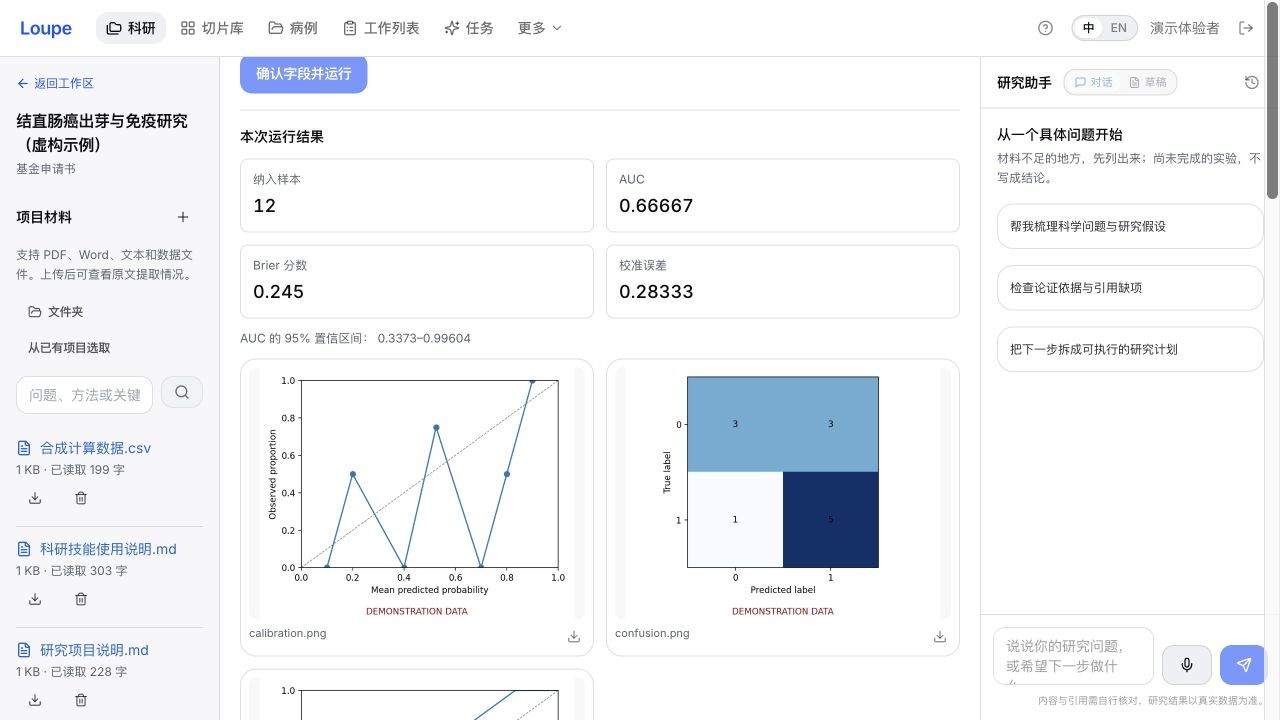
拿到结果,也拿到复核线索Receive the result and its audit trail

下载草稿、指标、图表与运行记录,按保留的输入和脚本复查计算。数据或关键规则变动后,项目会提示重新核对相关成果。Download drafts, metrics, figures and execution records, and review computations using the retained inputs and scripts. Changes to data or key rules flag related artifacts for another review.

准备资料 / Inputs
已保存草稿或固定统计输入Saved drafts or inputs for fixed statistics
形成成果 / Outputs
参考草稿、计算指标与复现资料Reference drafts, computed metrics and reproduction files
体验这一步 / Try this step →
计算与交付 · 合成演示界面 / Loupe experiment artifacts · synthetic demonstration点击放大 / View larger ↗
计算与交付 · 合成演示界面 / Loupe experiment artifacts · synthetic demonstration

共享科研技能 / Shared research skills

换模型,研究标准保持一致Change models, keep the research standard

将文献核查、数据分析和基金写作整理成可复用的方法。模型协助规划与表达,固定脚本负责计算,项目工作流保存需要复核的过程。Use reusable methods for source review, analysis and grant drafting. Models help plan and explain, fixed scripts handle computation, and the project workflow keeps the record for review.

原始文献核查Primary-source review

核对文献身份与实际阅读范围,区分摘要、正文和图表。把支持论述的依据定位到具体出处。Verify the source and what has actually been read, distinguishing abstracts, full text and figures. Locate the evidence behind each argument.

可复现定量分析Reproducible analysis

用固定脚本计算 AUC、Brier 分数和混淆矩阵,并核对样本归属、报告表格与保存文件。Fixed scripts compute AUC, Brier score and a confusion matrix, with checks on case assignments, report tables and saved files.

基金证据写作Evidence-linked grant drafting

依据已有材料组织论证,保留章节来源与材料版本。交付可编辑参考稿,并列出仍需补充的基础与证据。Build the argument from the material provided and retain sources and material versions for each section. Deliver an editable draft with a list of missing facts and evidence.

Codex 等宿主Hosts such as Codex

导出标准 SKILL.md 技能包,带上脚本和参考材料,在支持的宿主中继续使用。实际权限与运行环境由宿主提供。Export standard SKILL.md bundles with scripts and references for use in compatible hosts. The host supplies permissions and the execution environment.

Kimi · DeepSeekKimi · DeepSeek

通过各自的模型接口接入 Loupe,处理参数差异和多轮工具调用。实际效果仍需用具体研究任务评估。Loupe connects through each model’s API, handling parameter differences and multi-round tool calls. Evaluate actual performance on the research tasks you need.

任务预算与恢复Budgets & recovery

在预算内安排请求并保留任务历史。中断后按已保存的状态处理,避免对结果不明的请求重复生成。Keep requests within budget and retain task history. After an interruption, use the saved state and avoid repeating requests whose outcome is unknown.

研究方法可以复用,执行权限与预算由运行环境控制。具体资料是否支持论述、方法是否适用、结果如何解释,仍由研究者判断。Methods can be reused; the execution environment controls permissions and budgets. Researchers judge whether the material supports an argument, whether a method fits, and how to interpret the result.

验证范围 / Verification scope

软件、计算与科研结论,分开验收Verify software, computation and science separately

2026 年 11 月 14 日版本已完成本机软件检查与合成数据复现。这里记录功能和计算流程的检查结果;模型效果与临床有效性需要另行研究。The 14 November 2026 version completed local software checks and synthetic-data reproduction. These records cover functionality and calculation workflows; model performance and clinical validity require separate research.

检查 / Check输入与范围 / Input & scope记录 / Recorded result
后端与前端回归Backend & frontend regression本机离线软件检查Local offline software checks2056 / 278 项通过2056 / 278 passed
二分类计算与复现Binary analysis & reproduction12 条合成记录;含并列与阈值边界12 synthetic rows, including ties and threshold boundariesAUC 2/3 · Brier 0.245AUC 2/3 · Brier 0.245
工具续接与中断恢复Tool continuation & recovery离线接口响应与独立测试数据库Offline HTTP responses and isolated test databases保留状态与已知用量,避免重复生成State and known usage retained; duplicate generation avoided

你可以下载同一份 12 行合成 CSV,复查 AUC、Brier 分数及假阳性名单。固定输入下,假阳性编号为 DEMO-04、DEMO-05、DEMO-06。安装包中的独立技能脚本已用同数值输入核对保存文件与输出。Download the same 12-row synthetic CSV to review AUC, Brier score and the false-positive list. For this input, the false-positive IDs are DEMO-04, DEMO-05 and DEMO-06. The independent scripts in the local package were checked against saved files and stdout using numerically identical inputs.

11 项后端检查因可选环境未具备而跳过。Codex、Kimi、DeepSeek 的线上同题质量、延迟与费用对照尚未完成。合成数据检查只用于验证软件计算流程。Eleven backend checks were skipped because optional environments were unavailable. Matched-task quality, latency and cost comparisons across Codex, Kimi and DeepSeek remain outstanding. Synthetic-data checks validate the software calculation workflow only.

切片工具 / Slide tools

科研项目之外,保留熟悉的阅片工具Slide tools remain close at hand

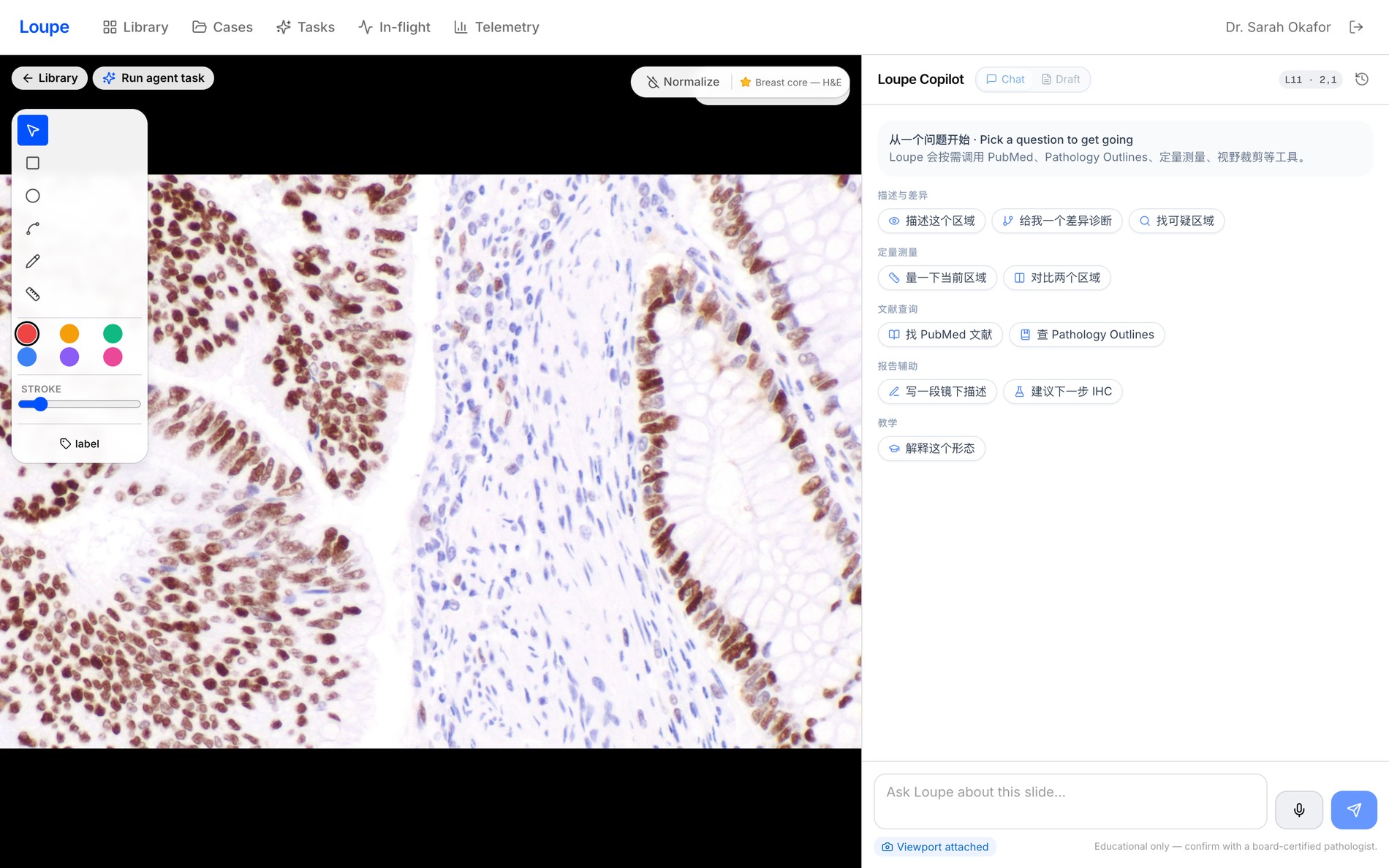
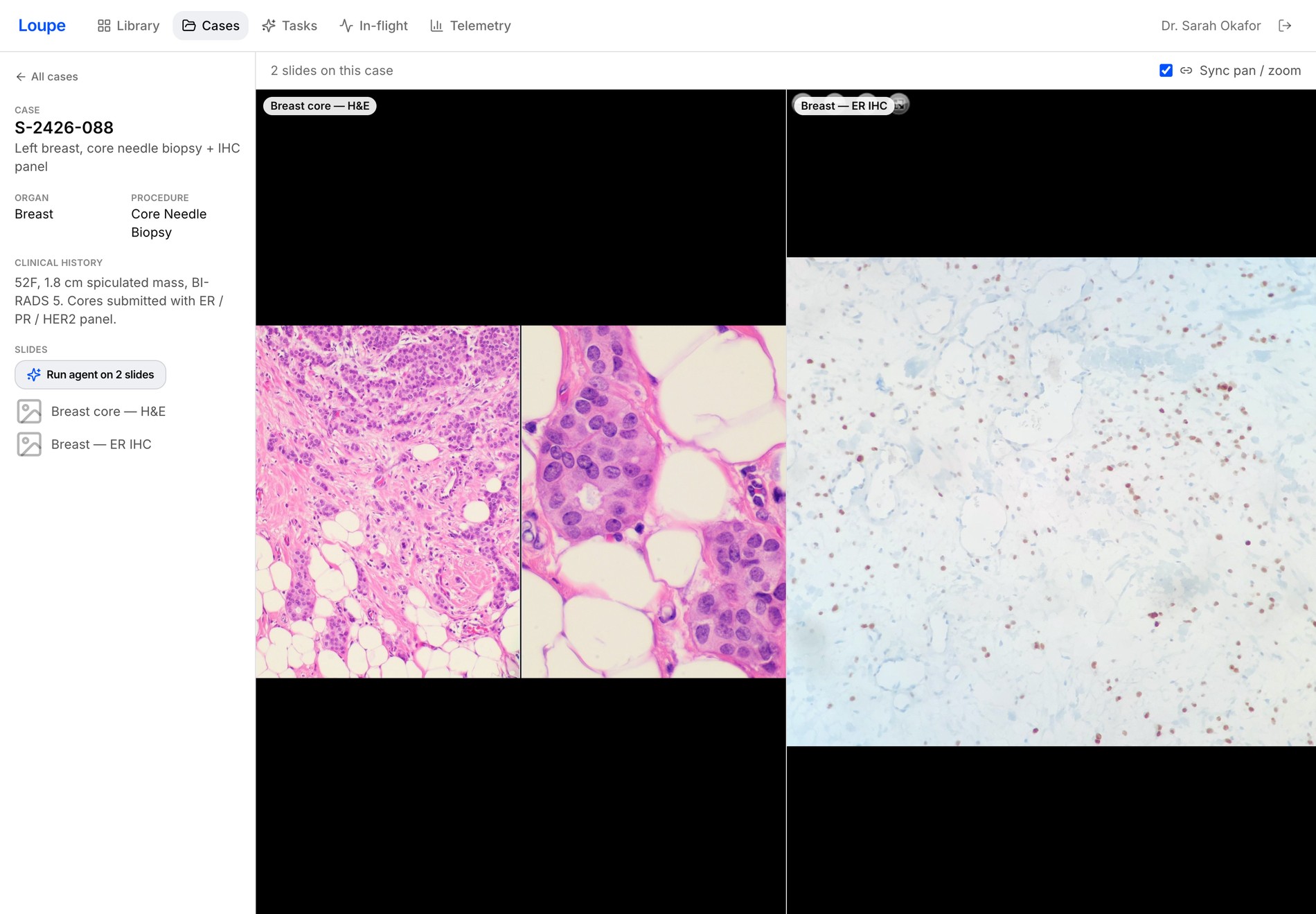
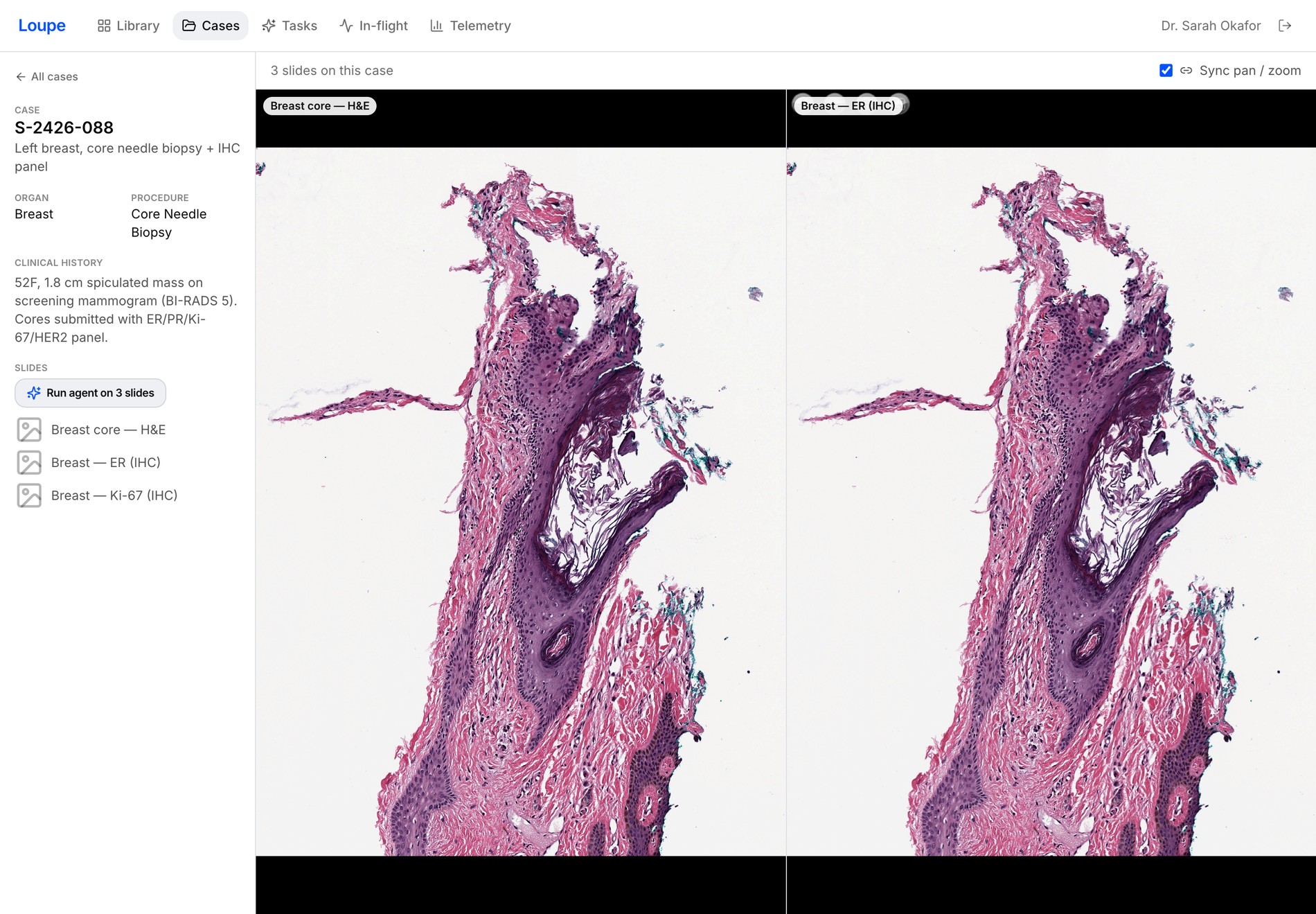
查看切片,整理病例材料,并排比较不同视野。以下界面使用公开教学样例,展示观察与讨论如何衔接。View slides, organize case materials and compare synchronized views. These product screenshots use public teaching examples to show how observation and discussion connect.

切片查看与会话工具(教学样例) / Slide viewer and chat tools — teaching example
切片查看与会话工具(教学样例)Slide viewer and chat tools — teaching example
病例材料组织(教学样例) / Case materials — teaching example
病例材料组织(教学样例)Case materials — teaching example
多切片同步对比(教学样例) / Synchronized slide comparison — teaching example
多切片同步对比(教学样例)Synchronized slide comparison — teaching example

开始使用 / Get started

先在本机体验,再配置研究环境Try locally, then configure your research environment

从三个病理示例开始,熟悉材料、草稿和固定统计。准备开展自己的研究时,再建立项目、连接模型,并按需配置更复杂的实验环境。Start with three pathology examples to explore materials, drafts and fixed statistics. When ready for your own research, create a project, connect a model and configure advanced experiments as needed.

能力 / CapabilityCore 基础部署Research 研究扩展
项目、资料、版本草稿与成果下载Projects, materials, draft versions and downloads✓✓
固定 CPU 统计与复现资料Fixed CPU statistics and reproduction files✓✓
模型辅助写作与科研任务Model-assisted writing and research tasks配置模型后使用Requires a configured model配置模型后使用Requires a configured model
高级代码实验 / EvoScientistAdvanced code experiments / EvoScientist独立配置,默认关闭Separate setup; off by default独立配置,默认关闭Separate setup; off by default
病理视觉模型扩展Pathology vision extensions不含模型权重No model weights bundled按模型准备依赖、权重和使用许可Configure dependencies, weights and permissions per model

本机演示Local demo

准备 Python 3.11 或 3.12,完整解压后打开“体验病理示例”。首次联网准备依赖,无需 Node.js;自己的研究使用“打开工作台”。Install Python 3.11 or 3.12, fully extract the package and open the pathology-example launcher. Initial setup needs network access, without Node.js. Use the workspace launcher for your own projects.

停止与清理Stop & clean up

“打开工作台”可在后台持续运行;“停止工作台”退出服务并保留数据。需要清理时先预览范围,再确认删除。The workspace launcher runs in the background. Stop the workspace to exit while retaining data. Preview the cleanup scope before confirming deletion.

切片与互操作Slides & interoperability

通过 OpenSlide 查看切片,按配置使用 DICOMweb 导入与报告数据导出。模型、权重和运行环境按实际研究需要准备。View slides with OpenSlide, with DICOMweb import and report-data export available according to configuration. Prepare models, weights and runtime environments for your research needs.